General Settings
Configure upload behavior, chunk sizes, and display preferences.
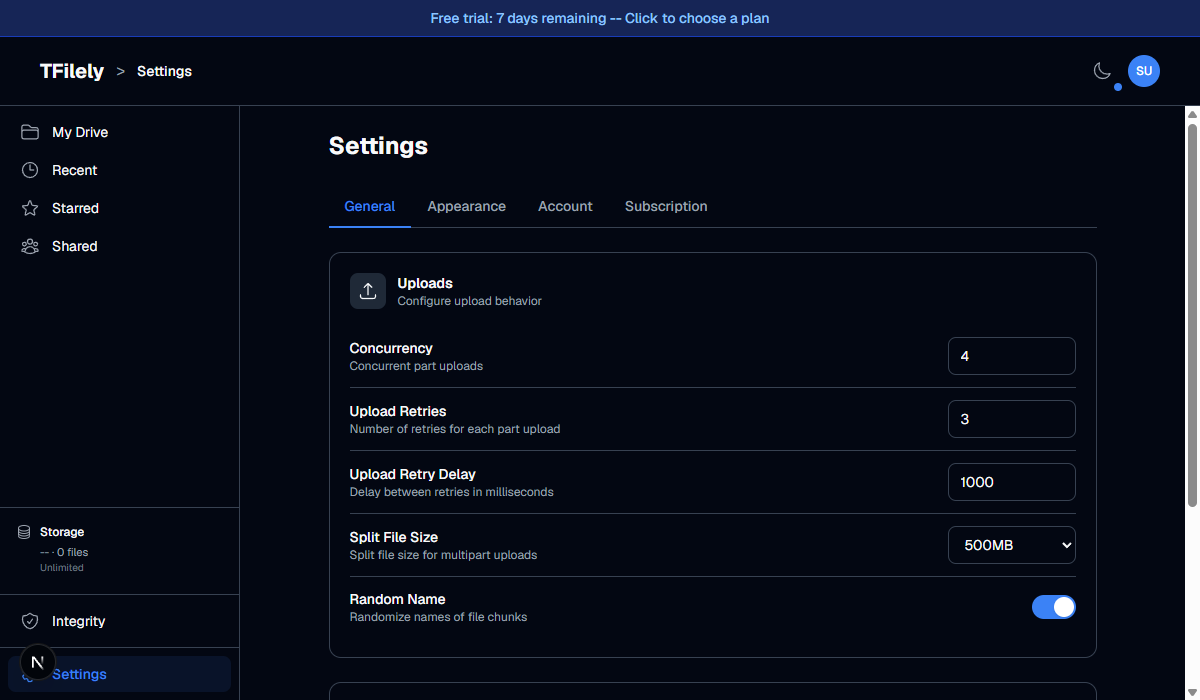
Settings Reference
| Setting | Default | Description |
|---|---|---|
| Upload Concurrency | 4 | Number of chunks uploaded simultaneously. Higher values upload faster but use more bandwidth. |
| Upload Retries | 3 | How many times to retry a failed chunk upload before giving up. |
| Retry Delay | 1000ms | Wait time in milliseconds between retry attempts. |
| Split File Size | 500MB | Maximum chunk size. Files larger than this are split into multiple parts. Options: 100MB, 500MB, 1GB, 2GB. |
| Random Chunking | On | When enabled, chunk names are randomized for privacy. Telegram cannot identify file names from individual chunks. |
| Page Size | 500 | Number of files loaded per page in the file browser. |
Recommended Values
- Upload Concurrency: 4 -- Good balance of speed and stability. Increase to 6-8 if you have a fast connection and multiple bots.
- Split File Size: 500MB -- Works well for most files. Use 1GB or 2GB if you regularly upload very large files.
- Random Chunking: On -- Recommended for privacy. Only disable if you need to debug upload issues.
Setup Wizard
Click the Setup Wizard button at the bottom of the General tab to re-run the initial setup flow. This lets you create additional bots, channels, and adjust rotation settings using the same guided wizard that appeared when you first set up your account.
Reset All
Click the Reset All Settings button at the bottom of the General tab to restore all settings to their defaults. This only affects general settings -- appearance, account, and subscription are not changed.